Skip to content
YUKFUE Download Free

Safety and honesty

Safety without fake promises.

YUKFUE is designed around transparency: benchmark first, review what will change, back up supported settings, and clearly label the rare actions that cannot be automatically undone.

The trust model

Know what changes. Keep a path back where supported.

Restore Center is a control for supported changes—not a promise that every Windows action or every possible outcome can be reversed.

Before → after measurement Backup before supported changes Individual restore controls One-way labels

Trust is a workflow

Control before confidence.

Safety language should help you make a decision, not pressure you into one. These are the controls YUKFUE puts before the claim.

  1. 01

    Benchmark first

    Measure a baseline before changing settings, then compare the result on your own PC.

  2. 02

    Review before applying

    See what a tweak or preset will change before you choose to apply it.

  3. 03

    Back up supported changes

    YUKFUE saves the original setting before a supported change is applied.

  4. 04

    Label one-way actions

    The rare actions that cannot be automatically undone are marked before you choose them.

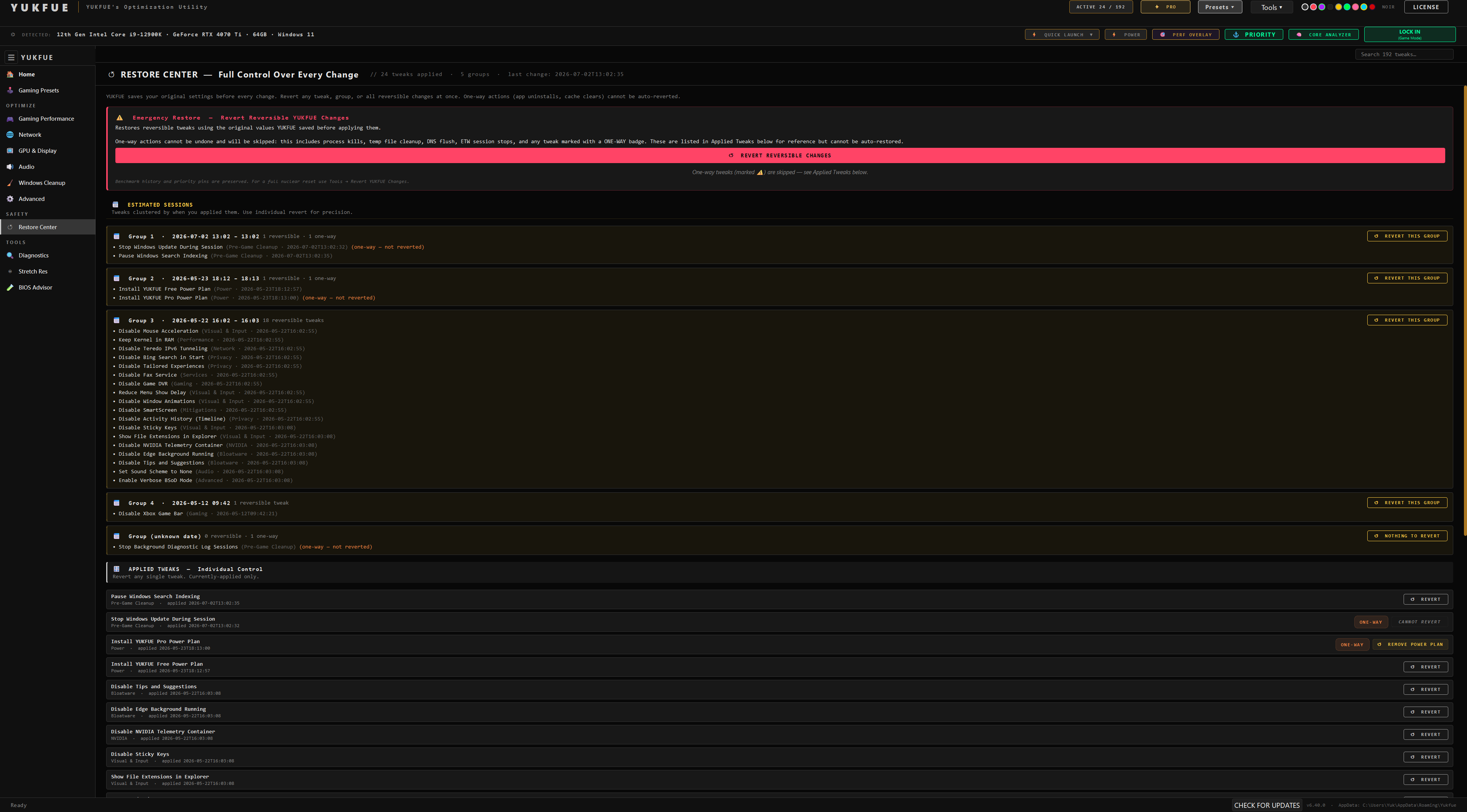
YUKFUE Restore Center showing backed-up changes and restoration controls
The real Restore Center in YUKFUE's Noir theme.

Restore Center

Back up first. Restore supported changes individually.

Before YUKFUE applies a supported tweak, it saves the original setting. Applied changes appear in Restore Center, where supported changes can be reverted individually.

Where the boundary is

A few actions cannot be automatically undone. YUKFUE labels those one-way actions before application. Restore Center is not a full-system backup and does not guarantee recovery from every Windows change.

On first launch, YUKFUE also recommends creating a Windows restore point as an additional Windows-level precaution.

SmartScreen and signing

Explain the warning. Do not dismiss it.

The current installer is not code-signed. Windows SmartScreen may therefore show “Unknown publisher” or “Windows protected your PC.” That message concerns publisher signing and reputation; it is not the same as an antivirus scan result, and it is not proof that a file is safe.

Use only the official GitHub release linked on the Download page. Match the source, filename, and SHA-256 before running it. If those details or the warning details do not match, stop and verify. Treat separate Microsoft Defender or antivirus detections on their own merits.

Check the Download page →

Administrator rights

System changes need system access.

Windows optimization can affect system-level settings such as the registry, services, and power plans. YUKFUE checks for administrator access at launch and warns when it is not elevated; it does not hard-block launch.

An elevation request should be expected only from a release you obtained through the official Download page. Avoid random reuploads, unknown links, and binaries passed around through community chats—including Discord.

Read common questions →

What we do not claim

Trust does not need a badge.

Optimization and security both depend on context. Confidence should come from clear controls, honest boundaries, and your own verification—not a universal promise.

  • A guaranteed FPS increase
  • A guaranteed latency decrease
  • A promise that every PC improves
  • Fake review or rating badges
  • Fake security badges or download counts
  • A universal safety guarantee

A short safe-use checklist

Pause, read, then apply.

  1. 01 Use the official GitHub release link on the Download page and verify its filename and SHA-256.
  2. 02 Run the benchmark before applying changes so you have a baseline.
  3. 03 Read the label before applying aggressive, advanced, or one-way actions.
  4. 04 Keep the Restore Center and its backup information available.
  5. 05 Change fewer things at once when you are testing or troubleshooting.
  6. 06 Stop if a file source or Windows security warning does not match the official page.

Support and next steps

Check the context. Ask when unsure.

Review the benchmark and tier details before applying changes. For community help and direct support, use the verified YUKFUE Discord—never treat an unsolicited binary in a chat as an official release.

Understand before applying

Measure first. Keep the caveats visible.

Start with Free, measure your own PC, and use Restore Center for supported changes.